ip
🟪PurpleGuy User Guide
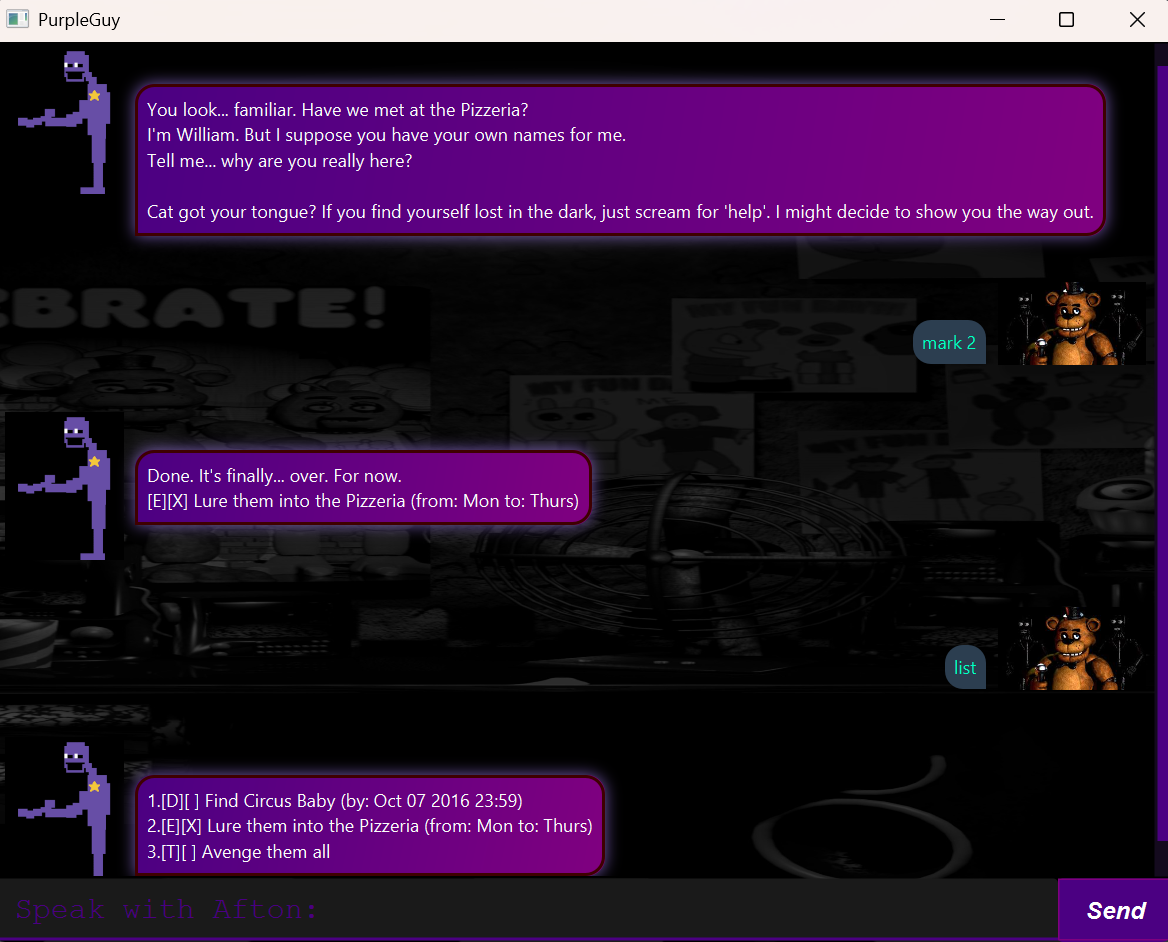
PurpleGuy is a task management desktop app, themed upon a certain popular indie horror villain😈.
It stores task information locally and is optimised for use via a Graphical User Interface (GUI)
📝 Adding Todo: todo
Add a task to the list
Format: todo NAME
Example:
todo Get Mike's birthday gift
Outcome: Adds a task with the name specified to the list
⏳ Adding Deadlines: deadline
Add a task with a deadline
Format: deadline NAME /by yyyy-MM-dd HH:mm
Example:
deadline Finish Meal Prep /by 2026-02-15 17:00
Outcome: Adds a task with the name and deadline specified to the list
📆 Adding Events: event
Add a task that spans over a time period
Format: event NAME /from TIME /to TIME
Example:
event Survive the Nights /from Night 1 /to Night 5
Outcome: Adds a task with the name, start and end times specified to the list
📜 Listing all Tasks: list
Display all tasks added to the app
Format: list
☑️ Marking Tasks: mark
Mark a task in the app as completed
Format: mark INDEX
Example:
mark 3
Outcome: Adds an X to the checkbox of the task specified by the index
⬜ Unmarking Tasks: unmark
Unmark a marked task in the app as incomplete
Format: unmark INDEX
Example:
unmark 1
Outcome: Removes an X from the checkbox of the task specified by the index
🔎 Finding Tasks: find
Find a task added to the app
Format: find NAME
Example:
find or
Outcome: Displays a list of tasks containing the name or a portion of the name specified
🗑️ Deleting Tasks: delete
Delete a task in the app
Format: delete INDEX
Example:
delete 2
Outcome: Deletes the task at the index specified
💡 Getting help: help
Get help on how to use a specific command or all valid commands in the app
Format: help [COMMAND]
Example:
help delete
Outcome: Displays the help information of the command specified, or all commands if no commands are specified
👋 Exiting the app: bye
Exit the app
Format: bye